BizisTech | No.1 Ecommerce Marketing Agency USA

#AmazonSellerTips

Blog

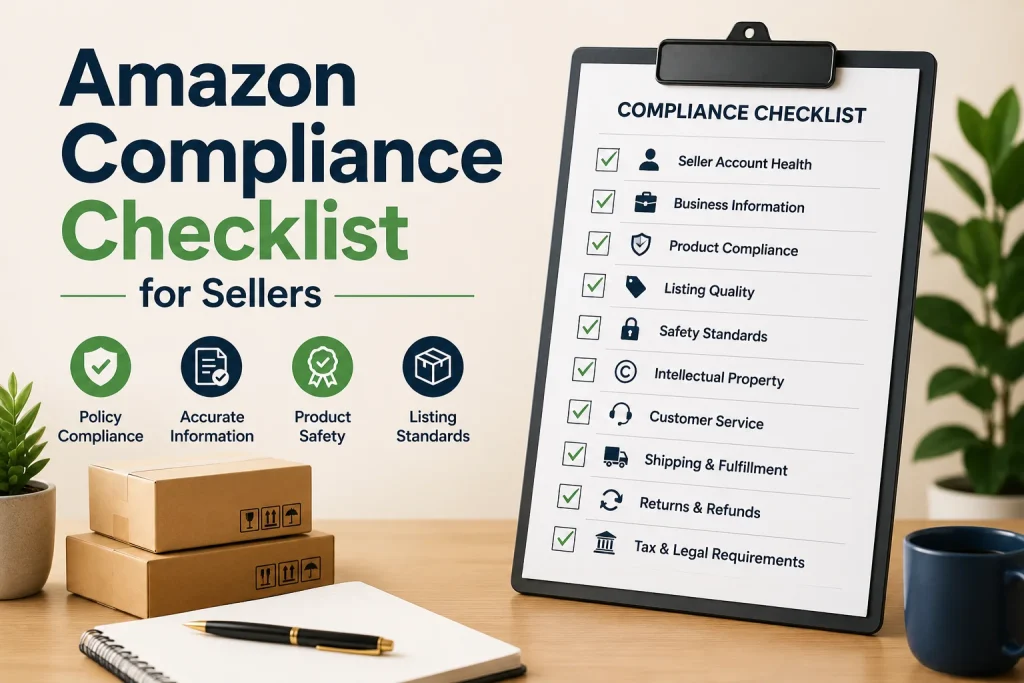
Amazon Compliance Checklist for Sellers

Selling successfully on Amazon requires more than creating listings and driving sales. Sellers must also follow marketplace policies maintain product information protect customers and respond quickly when compliance issues arise. A strong compliance process helps protect account health while creating a reliable shopping experience. Amazon regularly evaluates seller performance, policy compliance, product information and customer experience. Keeping these areas under control can reduce the risk of listing restrictions, policy violations or account problems. Amazon also provides account health and policy compliance tools that help sellers identify issues and take action. Understand Amazon Seller Policies The first step toward compliance is understanding the policies that apply to your business and products. Different categories can have requirements so sellers should review the rules relevant to their products before listing or launching them. Pay attention to product restrictions listing requirements, intellectual property rules, customer service expectations and seller performance standards. Amazon explains that account health reflects whether a seller is meeting the policies and performance expectations required to sell in its store. Verify Product Compliance Before selling a product confirm that it meets all safety and regulatory requirements. Certain products may require testing, certifications, warnings, labels or supporting documentation. Keep compliance documents organized and easy to access. Depending on the product and marketplace documentation may include invoices, certificates, test reports, safety information or other evidence requested during a compliance review. Amazon states that products without safety or regulatory documentation may face listing removal and can create account health concerns. Keep Product Listings Accurate Accurate product information is a part of seller compliance. Review product titles, descriptions, images, bullet points, specifications, variations and other listing information regularly. Avoid making claims that cannot be supported. Product information should accurately represent what customers will receive. Misleading descriptions incorrect specifications or unsupported claims can create customer complaints and policy concerns. A regular listing review can help sellers identify information before it becomes a larger problem. Monitor Account Health Regularly Account health should never be treated as something to check after receiving a warning. Make it part of your business routine. Review policy violations, performance notifications, customer experience indicators and other account health information. When an issue appears investigate its cause. Take corrective action promptly. Amazon describes its Account Health Rating as a way to assess the risk of account deactivation based on policy compliance and other factors. Maintain Authentic Product Documentation Product authenticity is another area of compliance. Sellers should maintain purchase records and supplier documentation that demonstrate where products came from. Work with suppliers and keep invoices organized. Documentation should be clear, accurate and connected to the products being sold. Strong record keeping can make it easier to respond if Amazon requests information about product authenticity. Review Intellectual Property Requirements Sellers should make sure their products and listings respect intellectual property rights. This includes trademarks, copyrights, patents, brand names, images and other protected materials. Do not use another brand name, image, logo or copyrighted content without authorization. Before adding branded products to your catalog verify that your sourcing and listing practices are legitimate. Keep Customer Experience Standards High Compliance is closely connected with customer experience. Product quality problems, inaccurate descriptions, late shipments, cancellations and unresolved customer issues can affect seller performance. Monitor customer. Return patterns to identify recurring problems. If several customers report the issue investigate the product or fulfillment process instead of treating each complaint as an isolated event. Manage Reports and Performance Data Seller reports can provide information for maintaining compliance and identifying operational weaknesses. Reviewing business, inventory, payment, advertising and performance information can help sellers make decisions. Amazon Reports Management can turn amounts of marketplace data into practical insights. Regular report analysis can help identify performance changes, inventory concerns, sales patterns and areas that require attention. For sellers managing products or marketplaces Amazon Reports Management can also support more structured performance monitoring and help teams focus on the most important business indicators. Keep Inventory and Fulfillment Under Control Inventory problems can affect both customer satisfaction and seller performance. Regularly review stock levels, fulfillment performance, shipment accuracy and product availability. Avoid allowing products to remain unavailable for periods when demand is strong. At the time excessive inventory can create unnecessary storage costs and operational challenges. A consistent inventory review process can help sellers maintain operations while reducing avoidable fulfillment issues. Respond Quickly to Compliance Notifications Ignoring a compliance notification can make a manageable problem more difficult. Sellers should review notifications carefully understand what caused the issue and determine what evidence or corrective action may be required. If an appeal or corrective action plan is necessary provide information and address the underlying problem. Simply submitting a response without fixing the root cause may lead to repeated issues. Create a Regular Compliance Routine A practical compliance routine can make marketplace management much easier. Sellers should regularly review account health, product documentation, listings, supplier records, customer complaints, inventory performance and policy notifications. Amazon Reports Management can support this process by helping sellers evaluate performance information and identify areas that deserve attention. Consistent monitoring allows sellers to make decisions instead of waiting until a serious issue develops. Final Thoughts Amazon compliance should be viewed as a business responsibility rather, than a one time task. Sellers who regularly review policies maintain accurate listings organize documentation monitor account health protect property and improve customer experience can build stronger marketplace operations.

Blog

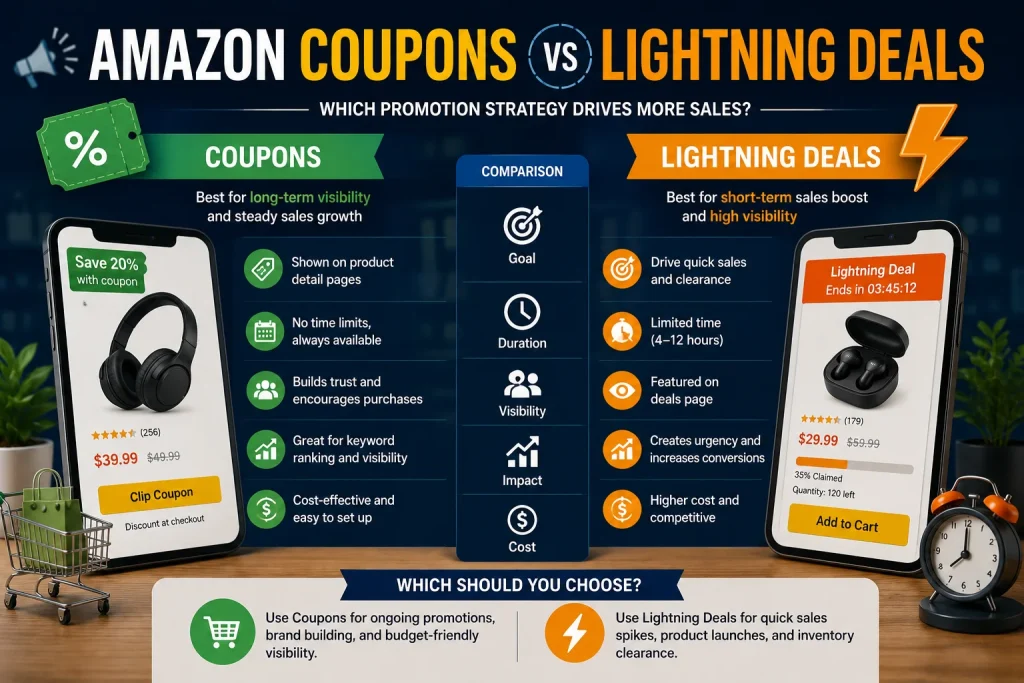
Amazon Coupons vs Lightning Deals

Choosing the promotion can make a big difference in how customers react to an Amazon product. Two common choices are Amazon Coupons and Lightning Deals. Both can get people to buy. They work differently and are better for different business goals. Knowing the difference between these two tools can help sellers keep their profits while also getting more visibility, more sales and more interest from customers. A good promotion should not just give a discount. It should fit with the product’s sales plan. What Are Amazon Coupons Amazon Coupons let shoppers get a discount on a product that’s eligible. The discount can be a percentage or a set amount off the price. Customers can usually see the coupon while they are looking around and can choose to use it before they finish buying. One big benefit of coupons is that they are flexible. Sellers can use them to get attention for products that need more clicks or more people to buy without putting the whole product into a short-time event. Coupons can be very helpful for products that already get a lot of traffic but need a little more to turn people into buyers. They can also help make an offer stand out when customers are looking at products. What Are Lightning Deals Lightning Deals are short-term promotions meant to create a sense of urgency. They are only available for a time and give shoppers a strong reason to buy right away instead of waiting. The short time frame is what makes Lightning Deals different from coupons. Of letting customers find a discount on their own a Lightning Deal makes them feel like the chance might be gone soon. This method can be helpful when a seller wants to get a boost in sales during a certain time. Lightning Deals can also be useful during shopping times when people are looking for good deals. Amazon Coupons vs Lightning Deals The main difference between Amazon Coupons and Lightning Deals is how they affect what customers do. Coupons are more about being flexible and being seen. Customers can find the discounted product while they are looking around and decide if the saving is worth buying. Lightning Deals are more about urgency. The short time frame makes shoppers want to buy If a seller wants to improve how often people buy every day a coupon might be the choice. If a seller wants to get an increase in sales a Lightning Deal might push more sales. When Amazon Coupons Make More Sense Coupons can be a choice when a product needs a steady reason to get people to buy. They are useful for products that get a lot of views and clicks but need help to turn those people into actual buyers. They can also work well for products that have profit margins because sellers have more control over how and when to run the promotion. Another advantage is that coupons can go along with advertising efforts. When customers come from ads and see a discount the offer can make the product more appealing. This is where an amazon ppc management service can be helpful. Advertising results should be looked at with promotion results so sellers can see if a discount is helping sales or just lowering profits. When Lightning Deals Make More Sense Lightning Deals work better when urgency is needed. Sellers can use them when they want to get a sales boost get rid of stock support a seasonal event or take advantage of a time when people are shopping a lot. They can also help when a product already has a lot of interest and the seller wants to push people to buy Sellers should be careful with the total cost of a Lightning Deal. More orders are not always good if the discount and the costs cut into profits much. How Promotions Can Work With Advertising Promotions and advertising should not be seen as separate. A discount can make a product more attractive and advertising can bring people to the product. For example a seller might use an amazon ppc management service to check how advertising is doing before during and after a promotion. Comparing clicks, how many people buy, sales and ad costs can show if the promotion actually helped the campaign. The goal is not just to get sales. The goal is to get sales that make money and help the product do well over time. Common Mistakes Sellers Should Avoid One mistake is giving a discount without knowing the products profit. Sellers should check the costs, shipping, ads and promotion costs before deciding how discount they can give. Another mistake is using promotions often. If customers always expect a discount they might not buy at the price. Sellers should also not use a promotion just because others are using one. Every product has profits, demand, customer behavior and stock needs. A promotion should always have a goal. How to Choose the Right Promotion Start by figuring out what the main goal is. If the goal is to give people a reason to buy while having some freedom a coupon could be right. If the goal is to make people feel like they need to buy and get more sales in a short time a Lightning Deal might be better. Think about the products profit, how much stock is available past sales, competition, time of year and how advertising is doing before making a choice. An amazon ppc management service can also help sellers see if the promotion is bringing in buyers and if ad money should be changed around the promotion time. Final Thoughts Amazon Coupons and Lightning Deals can both help with sales. They do different things. Coupons are usually more flexible. Can give people a reason to buy while Lightning Deals are about time limits and urgency. The best plan is not always the one, with the discount. It is the one that fits the products goals, its profits, its stock and what

Blog

Amazon Product Video Optimization Guide

Product videos have become an important part of creating a strong Amazon listing. High quality images can explain what a product looks like, but video can demonstrate how it works, how it is used, and why customers should consider buying it. A well planned video can make a product easier to understand while creating a more engaging shopping experience. For sellers who want to improve their product listings, video optimization should be treated as part of the overall content strategy rather than an additional task. The right video can answer customer questions quickly, demonstrate important benefits, and help shoppers feel more confident about their purchase. Why Amazon Product Videos Matter Online shoppers cannot physically touch or test a product before buying it. This can create uncertainty, especially when the product has complicated features or requires a particular method of use. A product video can reduce that uncertainty by showing the product in action. Customers can see its size, appearance, functionality, setup process, and practical benefits in a way that static images cannot always communicate. Product videos can also make a listing more engaging. Instead of asking customers to understand every feature through written descriptions, sellers can demonstrate important information visually. Amazon has reported that product detail pages with shoppable videos have seen higher sales on average than pages without them. Start With a Clear Video Purpose Before creating a product video, decide what you want the video to accomplish. A good product video should have one primary purpose. It could demonstrate how the product works, explain an important feature, show an unboxing experience, provide setup instructions, or present the product in a realistic lifestyle environment. Trying to explain everything in one video can make the content confusing. Instead, identify the biggest question customers have about the product and build the video around answering it. For example, if the product has a complicated setup process, focus on showing the setup clearly. If durability is an important selling point, demonstrate the product being used in an appropriate real life situation. Create a Strong Opening The first few seconds of a product video are extremely important. Customers can quickly move to another part of the listing if the content does not immediately appear useful. Start by showing the product and its most important benefit. Avoid long introductions that delay the main message. A strong opening can demonstrate the product being used, reveal an important feature, or immediately show the problem that the product solves. The goal is simple. Give customers a reason to continue watching. Keep the Product at the Center Your product should remain the main focus throughout the video. Background elements, excessive animation, and unnecessary effects can distract customers from the information that matters. Use clear lighting and an uncluttered environment. Show the product from useful angles and demonstrate its important functions naturally. Amazon recommends keeping product videos simple and focused, with many effective shoppable videos falling within a relatively short viewing duration. Demonstrate Benefits Instead of Only Features A common mistake is creating a video that simply lists product features. Customers usually want to understand how those features benefit them. Instead of only showing that a product has a particular feature, demonstrate what that feature allows the customer to do. Show the product solving a real problem or making a particular task easier. This approach makes the video more useful and helps customers visualize themselves using the product. Use Clear Visual Storytelling A strong product video should have a simple visual flow. Begin with the product and its main benefit. Then demonstrate how it works. Follow this with important features or practical uses. Finish by reinforcing the overall value of the product. The video should feel natural rather than overloaded with information. Simple transitions, clear product demonstrations, and realistic usage scenes can make the content easier to follow. Optimize Text for Silent Viewing Not every shopper will watch a product video with sound. Important information should therefore be understandable through visuals and short text overlays. Keep on screen text concise and easy to read. Use it to highlight important features, measurements, benefits, or instructions rather than filling the screen with paragraphs. Text should support the visual demonstration rather than replacing it. Choose an Effective Thumbnail The thumbnail can influence whether a shopper decides to watch the video. Choose an image that clearly shows the product and communicates its main benefit. Avoid confusing frames, excessive text, or images where the product is difficult to recognize. A strong thumbnail should look professional while remaining consistent with the rest of the product listing. Maintain Consistent Listing Content Your product video should match the information presented throughout your listing. Product names, features, benefits, appearance, and claims should remain consistent across images, bullet points, descriptions, and video content. Consistency builds customer confidence. If the product looks different in the video or a feature is presented differently from the written listing, customers may become uncertain about what they are purchasing. A complete listing strategy should bring together written content, images, video, and other visual elements to create one clear customer experience. Follow Video Requirements Carefully Before uploading a product video, review the current requirements for the relevant Amazon video placement. Amazon supports product videos through its seller tools and provides specifications and content requirements for different video placements. For shoppable product videos, sellers can upload formats such as MP4 or MOV and provide information including the video title, associated product, video type, language, and thumbnail. Sponsored video placements can have different technical and creative requirements, so sellers should always check the requirements for the specific placement they are using. Following these requirements can reduce the risk of rejection and prevent avoidable upload problems. Use Amazon Reports Management for Better Decisions Creating a product video is only the beginning. Sellers should also evaluate how their overall listing performs after making content improvements. Amazon Reports Management can help sellers organize and review important business information to understand what is happening with their products. When video is combined

Scroll to Top